Everything you need for anonymous reporting, investigations and anonymous feedback
Secure reporting, case handling, workflow automation, analytics, AI assistance, audit records and anonymous feedback—together in one anonymity platform.
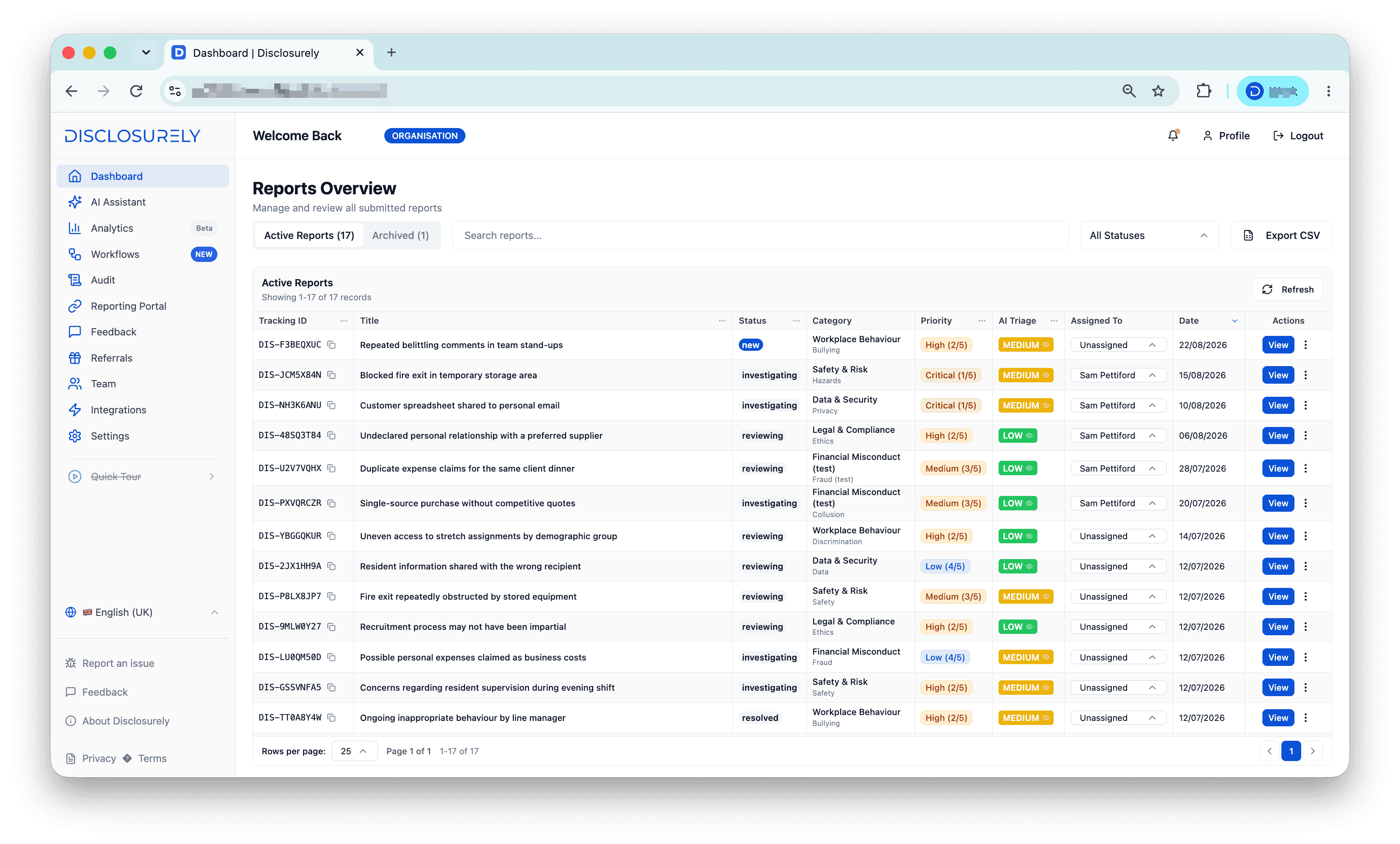
One workspace for every report and case
Search report records, see what needs attention and keep status, priority, triage and ownership visible as handlers progress each case.
- Search and filter report records
- Track status, priority and ownership
- Export case data when required
A case-aware assistant that stays under human control
Select a case, add relevant organisation documentation and ask focused questions. The assistant helps authorised handlers prepare; it does not investigate or decide outcomes.
- Work with a selected case and organisation documents
- Ask follow-up questions in a conversation
- Review every response before taking action
Case context and sources stay visible, follow-up questions remain conversational, and handlers choose what to use.
See the operational picture behind case activity
Move from individual records to a clear view of reporting volume, investigation workload, case status, response health and assignment pressure.
- Follow reporting movement and investigation load
- See assignment pressure and response health
- Export operational reporting
Turn routing and response policy into a visible workflow
Assignment rules can route matching cases, SLA policies apply response targets, and workflow history records what the automation did. Escalation remains part of the configured policy.
- Route cases with assignment rules
- Apply response targets with SLA policies
- Record automation and escalation history
A verifiable record of system activity
Review who did what, when it happened and which record was affected. Disclosurely’s audit trail records system-wide events and exposes chain verification status.
- Record actor, action, target and severity
- Filter and export the audit history
- Verify the tamper-evident event chain
Audit entries are cryptographically linked so the chain can be checked for integrity.
Configure the channel and preview the reporter experience
Manage the public reporting URL, languages and branding on one side, while keeping the employee-facing reporting experience visible on the other.
- Configure access links, languages and branding
- Use a standard subdomain or custom domain
- Preview the employee-facing reporting experience
Collect candid employee feedback with anonymous forms
Create campaigns, invite respondents anonymously, and review themes once anonymity protections allow safe sharing. Anonymous Feedback sits beside speak-up—it is not appraisal software.
- Create anonymous feedback forms and campaigns
- Invite respondents without requiring identification
- Review themes and insights with anonymity protections
The supporting controls teams use every day
Useful capabilities that sit around the core product tour—kept compact, because they support the work rather than replace it.
Team access and roles
Invite team members and control access with organisation roles.
Secure messaging
Keep follow-up conversations connected to the relevant report.
Evidence and attachments
Add files to report and case workflows where supporting evidence is needed.
Multilingual reporting
Offer reporting channels in the languages configured for the organisation.
Branding
Apply organisation identity to the employee-facing portal.
Custom domains
Use a standard reporting address or configure an organisation domain.
Exports
Export report, analytics and audit data where available.
Organisation configuration
Manage categories, portal settings and workspace preferences.
See how the product fits your reporting workflow
Start a trial to explore the workspace, or book a focused walkthrough of the features your team needs.