Whistleblowing case management
Whistleblowing case management software for the people who handle reports
Every report arrives as a case with a status, a priority and an owner. Review it, ask the anonymous reporter questions and keep a record of who did what, in one place.
- 14-day free trial
- No credit card required
- Pro £39.99/month, unlimited employees
How a case moves
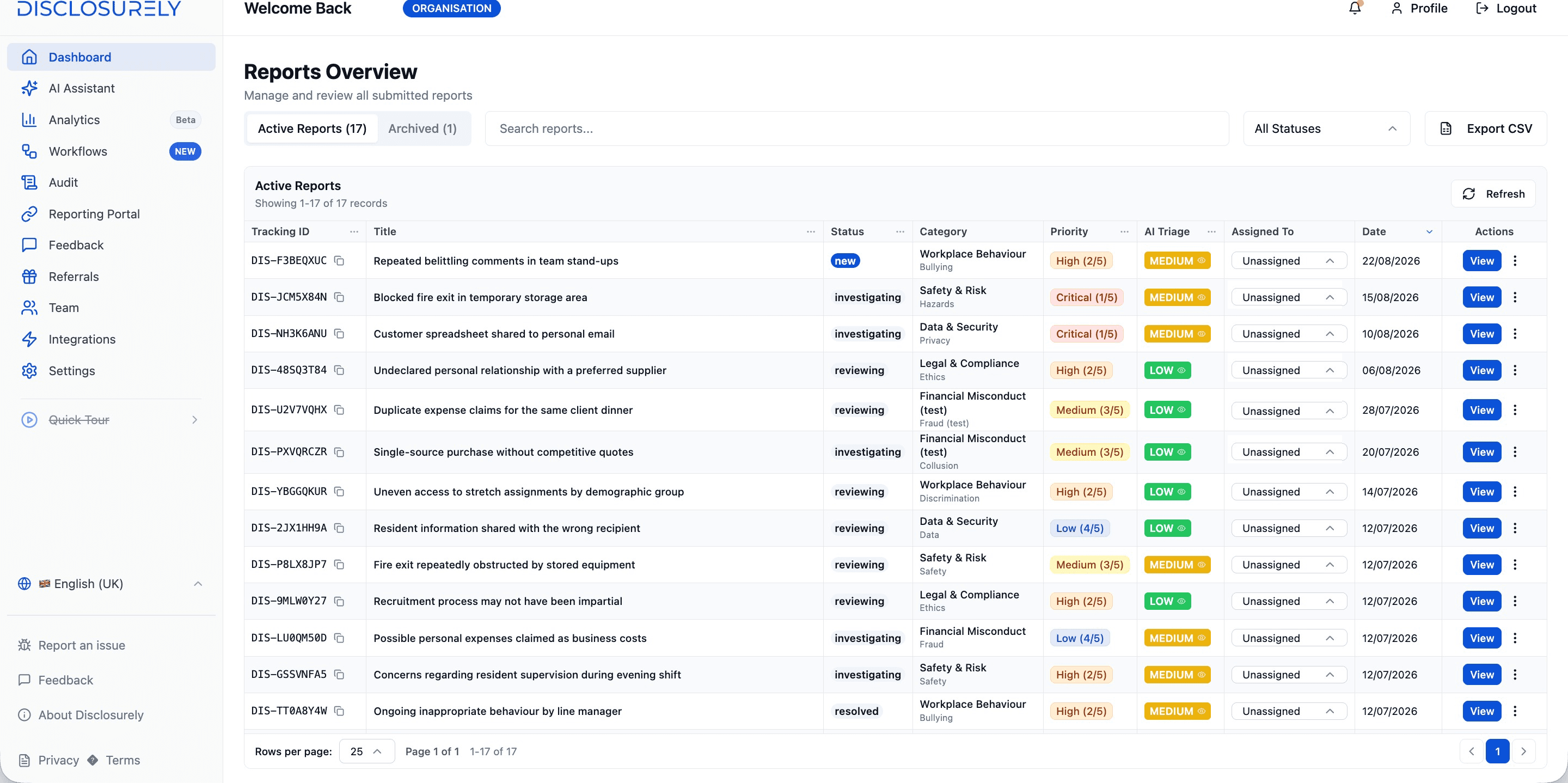
One list, four statuses and a named owner for every case
Reports land in one list instead of a shared inbox. Your team sets each status, and the reporter sees the change when they check in with their tracking ID.
01 · New
It arrives
The report becomes a case with a tracking ID. Your team gets an email alert, and an AI risk assessment is added automatically.
02 · Reviewing
Someone takes it
A handler opens the case, sets the priority and becomes its owner. Reassign it when someone is away.
03 · Investigating
The work happens
The handler reviews what was reported and asks the reporter questions in the secure thread.
04 · Resolved
It's closed
The case is marked resolved. Archive it to clear the active list; you can restore it later.
What every case carries
- Category
- Your own two-level list. Admins add, rename, reorder or retire categories.
- Priority
- Critical to info, set by your team. AI triage suggests a risk level on every new report.
- Assigned to
- One named owner per case. Every assignment change is logged.
- Find and export
- Search by title or tracking ID, filter by status, sort by priority or risk, export to CSV.
- Roles
- Org admins manage the team, categories and settings, and see analytics and the audit trail. Case handlers work cases. Both can see every case in your organisation.
Review and follow up
Read what was reported, then ask the reporter what's missing
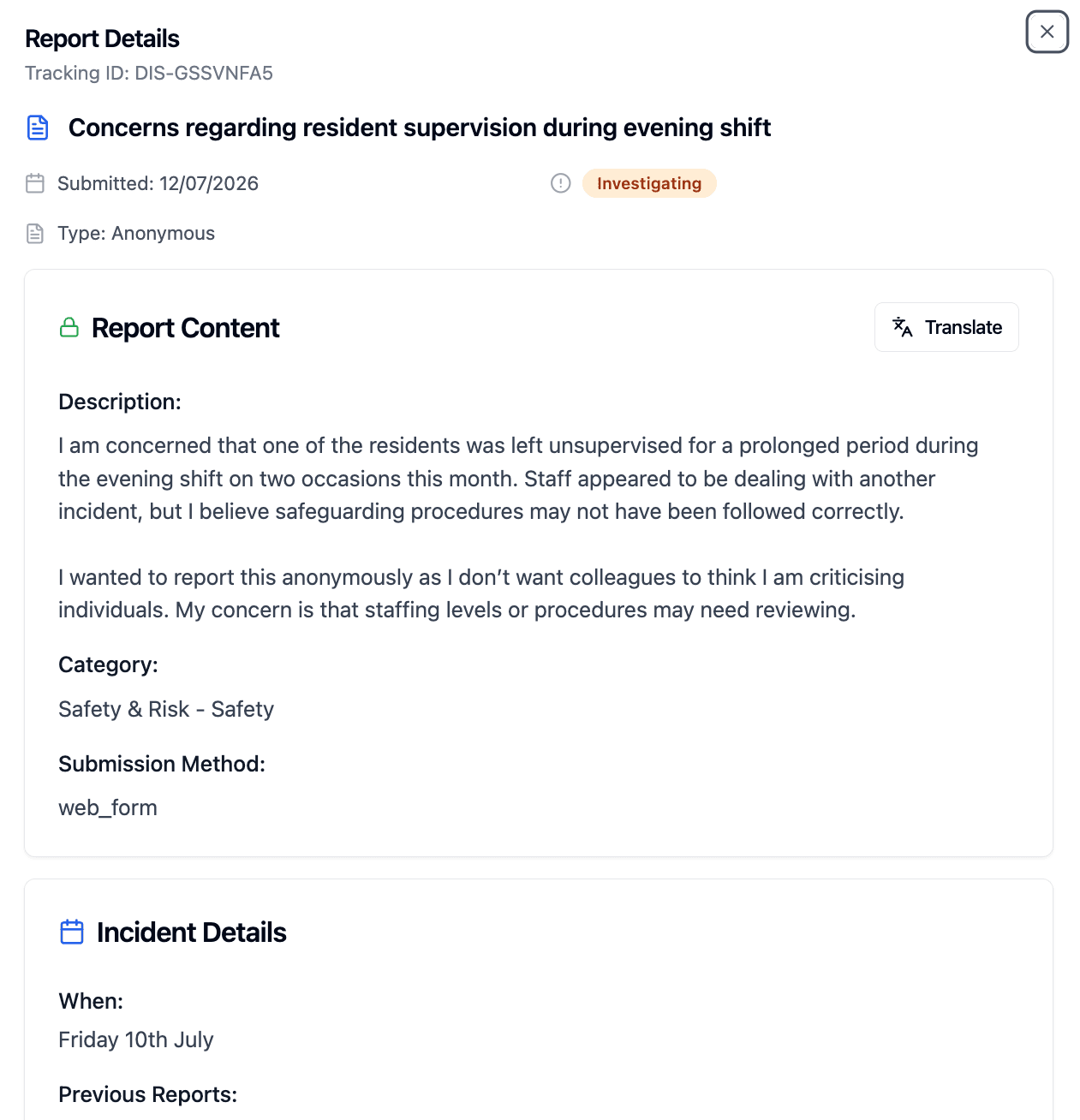
Everything the reporter sent
The case shows the report as submitted: the description, category, when and where it happened, and any attached files. Translate it into your language with one click.
- Files
- PDF, Word, Excel, PowerPoint, JPEG, PNG and ZIP; up to 20 per report, 50 MB each
- Metadata
- EXIF data in JPEG and PNG images, and document properties in PDF and Office files, is removed on upload
- Downloads
- Every attachment download is recorded in the audit trail
Files come from the reporter. Handlers can't add files or internal notes to a case today, so keep your own investigation documents in your organisation's secure storage.
How evidence is handledQuestions, without knowing who they are
Message the reporter from the case. They read and reply when they check in with their tracking ID and access secret, with no name or email needed. Messages are encrypted in the database, can be translated one at a time, and each one is recorded in the audit trail.
What the reporter seesAI assistance
AI that helps handlers prepare, not decide
Risk triage on every report
Each new report gets a suggested risk level, with severity, likelihood and impact scores and its key concerns. Your team still sets the priority.
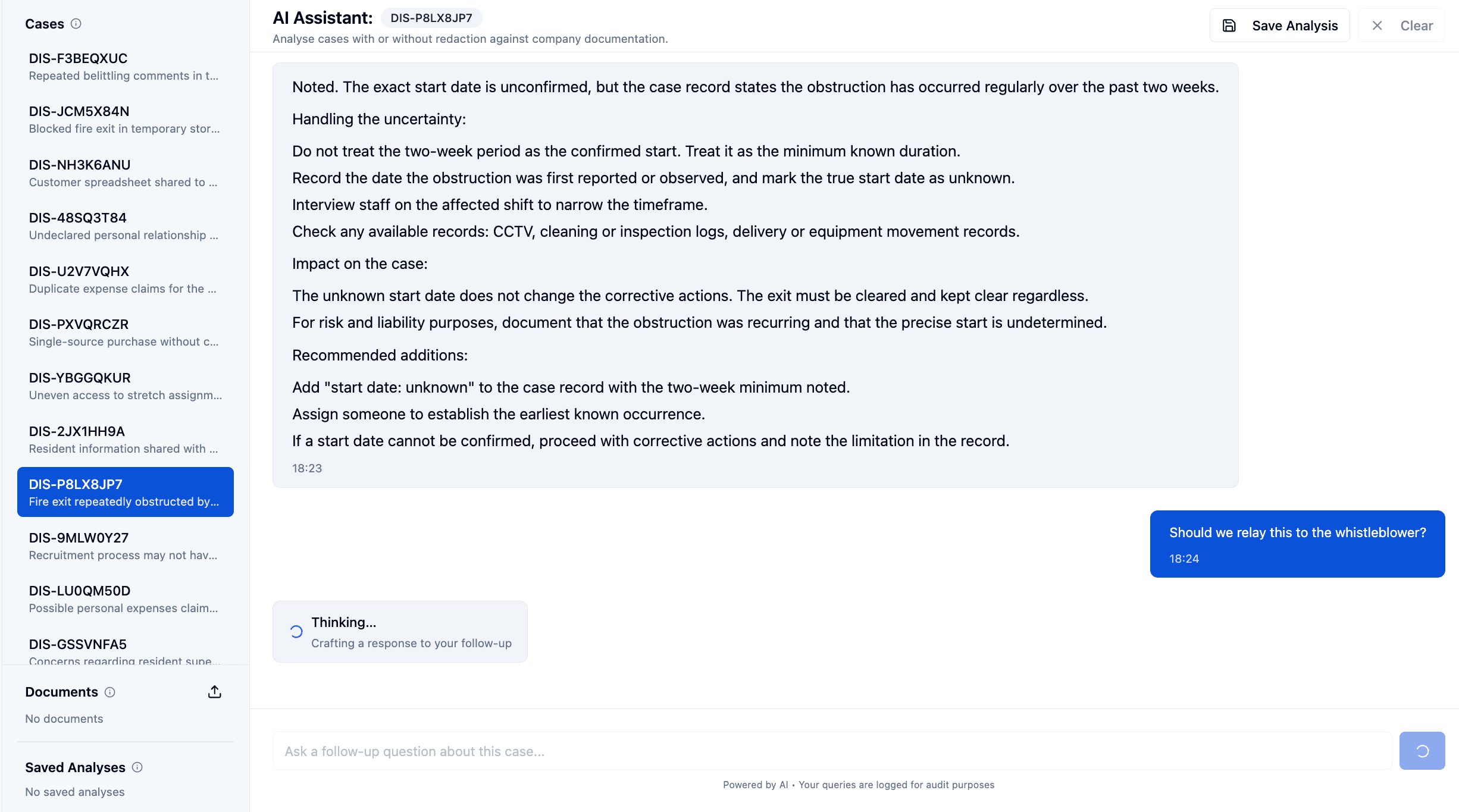
An assistant for the case in front of you
Pick a case, add your own policy documents if you like, and get suggested actions, a risk assessment and next steps. Ask follow-up questions and save the analysis. Personal details are redacted before a question is sent, unless you switch redaction off.
Report content is processed by third-party AI providers, including automatically for triage and search. The AI Assistant is included in Pro.
The record
A record of who did what, and when
Disclosurely logs case activity as it happens. Entries keep the before and after state, team members can't edit or delete them, and admins can filter the log and export it as CSV or JSON.
Export any case as a PDF with its details, content and AI risk summary. Admins also see analytics on open and closed cases, response times, unassigned cases and each handler's load.
How the audit trail worksreport_submittedA report arrives through your portalcase.assignA case is assigned or reassignedcase.updateStatus or priority changes, with the old and new valuesreport.message_sentYour team or the reporter sends a messagereport.attachment_downloadedSomeone downloads a file from the casecase.ai_analysisAn AI analysis is run on a case
A selection of the events Disclosurely records, shown with their names in the audit log.
Fit
Built for whistleblowing cases, not every kind of case
A strong fit when
- Reports arrive through a reporting channel, often anonymously
- You need to keep talking to someone who won't give their name
- A small HR, compliance or legal team needs one record of each case
Look at other tools when you need
- Customer service ticketing, a CRM or legal matter management
- Investigation suites with interview scheduling, task plans and multi-source evidence
- Integrations with HR systems or single sign-on, which Disclosurely doesn't offer today
Pricing
Case management is part of Pro
Pro includes the reporting portal, secure messaging, case management, the audit trail and AI assistance, for one flat price covering unlimited employees.
- Report descriptions and messages are encrypted in the database with an organisation-specific key
- Two-factor authentication available to every team member
- Sessions end after 15 minutes of inactivity
Pro
£39.99/month
or £399.90/year, two months free
Start free trial14-day free trial. No credit card required.
FAQ
Whistleblowing case management FAQs
What is whistleblowing case management software?
It's software for the people who receive whistleblowing and workplace reports. It turns each report into a case with a status and an owner, lets the handler communicate with the reporter, and keeps a record of what was done. In Disclosurely, case management sits behind the anonymous reporting portal, so every report becomes a case automatically.
How is it different from general case management software?
General case management tools are built for customer service, social care, healthcare or legal work. Whistleblowing case management has to protect the reporter's identity, keep a conversation going with someone who may be anonymous, and leave a record you can show later. Disclosurely is built for that narrower job.
Who in our organisation can see a case?
Only the people you invite to your Disclosurely organisation, as org admins or case handlers. Disclosurely doesn't currently let you exclude a specific team member from an individual case, so consider conflicts of interest when you decide who to invite.
Does Disclosurely track deadlines such as the 7-day acknowledgement?
Disclosurely records when each report arrives and when its status changes, so you can show your timings. It doesn't currently send deadline reminders, so keep your own process for acknowledging reports within 7 days and giving feedback within 3 months where the EU Whistleblowing Directive applies.
Does the AI make decisions about cases?
No. AI suggests a risk level for each new report and, on request, suggests actions and next steps. Your team sets the priority and decides what happens. Report content is processed by third-party AI providers.
Is case management included in the free trial?
Yes. The 14-day free trial includes Pro features, including case management, secure messaging and the AI Assistant. No credit card is required. Pro then costs £39.99 per month or £399.90 per year.
Run your next case in Disclosurely
Set up your reporting portal, submit a test report and work it as a case. It takes minutes.
14-day free trial. No credit card required.