Introductory pricing: Lock in £39.99/month while introductory rates are available.
Whistleblowing software

Whistleblowing software your people can trust and your team can actually run

Disclosurely gives employees a confidential way to raise concerns without having to give their name, and gives your team one secure workspace to follow up, investigate and record every outcome.

  • 14-day free trial
  • No credit card required
  • Pro from £39.99/month
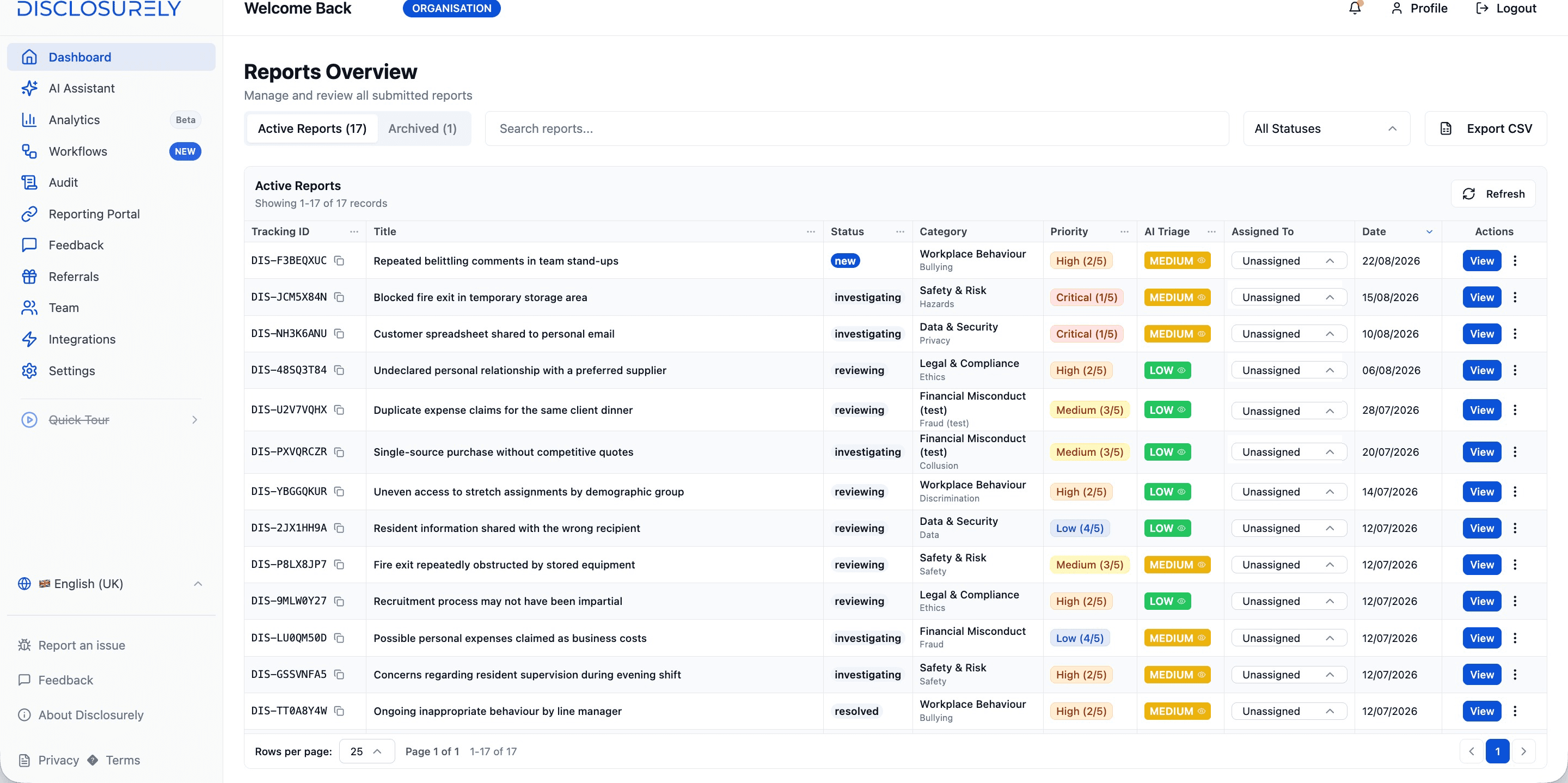
Disclosurely Reports Overview showing active reports with tracking ID, status, category, priority, AI triage and assignment columns
  1. A tracking ID for every report

    Reporters use it to check back and reply, without giving their name.

  2. Status at a glance

    See which cases are new, under review, being investigated or resolved.

  3. A named owner

    Assign each case so nothing sits in a shared inbox.

Why it matters

Reporting rarely fails at the report. It fails afterwards.

Most organisations have some way to raise a concern: an email address, a form, a manager’s door. The trouble starts once a report arrives.

  1. 01

    Nobody can ask a follow-up question

    An anonymous email or form is one-way. If the concern is vague, there is no safe way to ask what happened, when, or who else saw it.

  2. 02

    Nobody clearly owns it

    Reports land in a shared inbox or with whoever was copied in. Days pass before anyone acknowledges the person who spoke up.

  3. 03

    The record has to be rebuilt

    When the board, an auditor or a tribunal asks what was done, the answer is scattered across emails, spreadsheets and memory.

Whistleblowing software closes those gaps by keeping the report, the conversation and the decisions in one place.

How it works

What is whistleblowing software?

Whistleblowing software, sometimes called a whistleblowing system or whistleblower software, gives workers a secure, always-available channel to report wrongdoing such as fraud, safety risks, harassment, bribery or data misuse. It gives the organisation a structured way to receive, investigate and resolve those reports while protecting the person who raised them.

In Disclosurely, every concern moves through four stages.

1 · Report

A reporting channel people will actually use

People only speak up through a channel they trust and can find. Disclosurely gives you a branded reporting portal that works on any phone or computer, with nothing to install and no account for the reporter to create.

Anonymous by default
No name, email or account is requested. Reporters can include contact details in their report if they choose to.
A way back in
A tracking ID and private access secret let them check progress and reply later. They can also save a draft and finish it another time.
Your portal, your name
Add your branding and use a custom domain such as yourcompany.com/report.
Easy to share
Put the link or a QR code on posters, noticeboards, the intranet and staff handbooks.
More about anonymous reporting
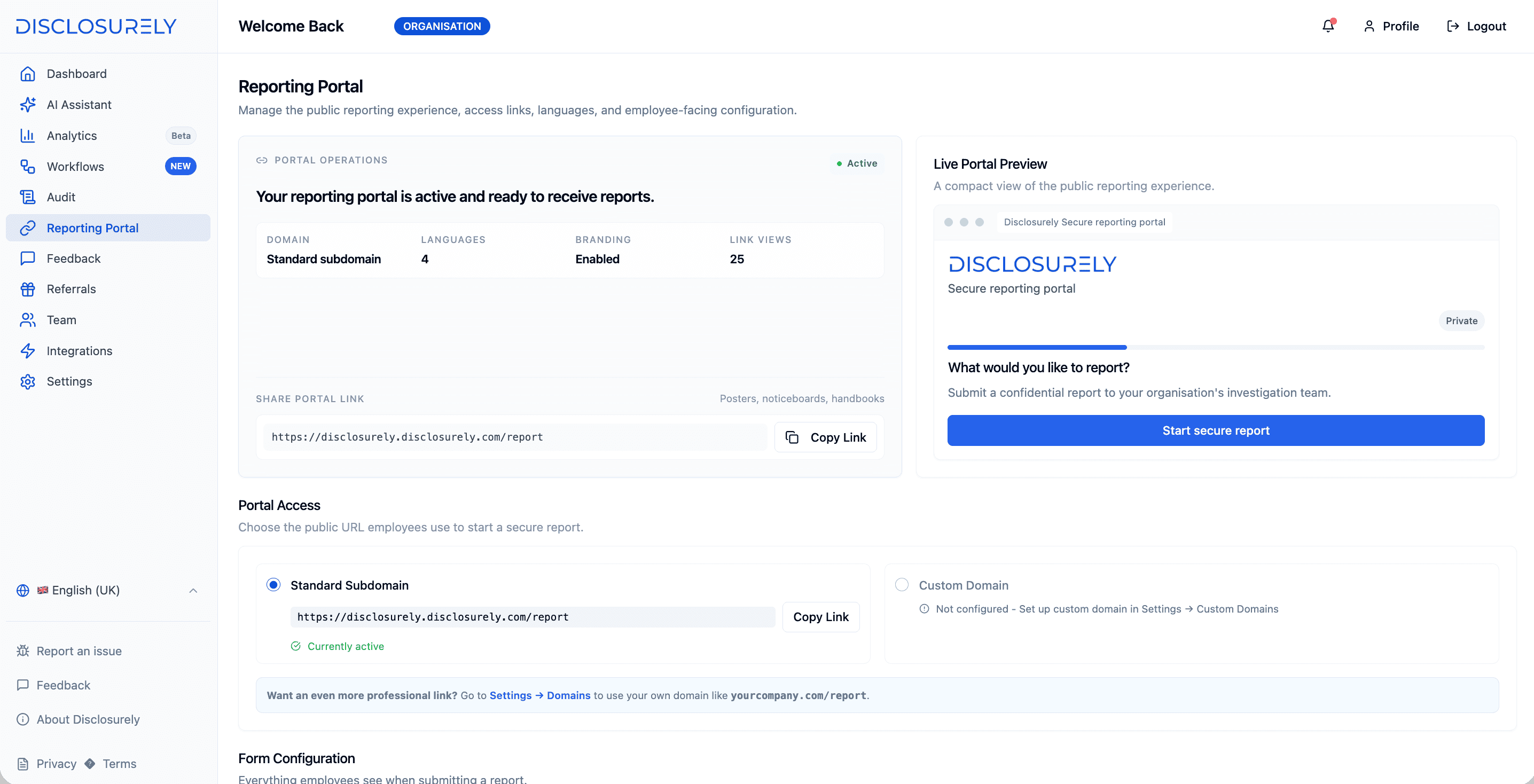
Disclosurely Reporting Portal settings showing an active portal, branding, languages, the shareable portal link and a live preview
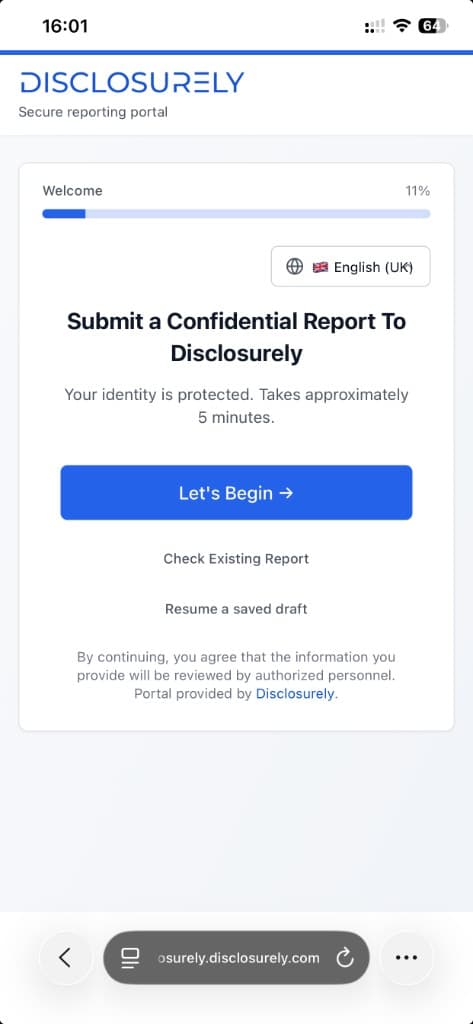
Disclosurely secure reporting portal on a mobile phone, with options to begin a report, check an existing report or resume a saved draft
How anonymous follow-up worksDiagram
ReporterSigns in with tracking ID and access secret
Secure case threadMessages stay on the case
Case handlerAuthorised team member
  • Questions
  • Answers
  • Status updates

Name, email and account details are never required

2 · Follow up

Ask questions without asking who they are

Most concerns arrive incomplete. Disclosurely gives each report a secure two-way conversation, so handlers can ask for detail while the reporter stays anonymous.

The reporter returns with their tracking ID and access secret to read messages and reply. Every message stays attached to the case, not in someone’s personal inbox.

Good to know: Reporters do not receive email alerts, because the portal does not ask for an email address. Encourage them to check back using their tracking ID.

How secure messaging works

3 · Investigate

Every report becomes a case with an owner

Reports arrive in one dashboard, not a shared inbox. From there, your team can see what needs attention, decide who handles it and keep everything about the case together.

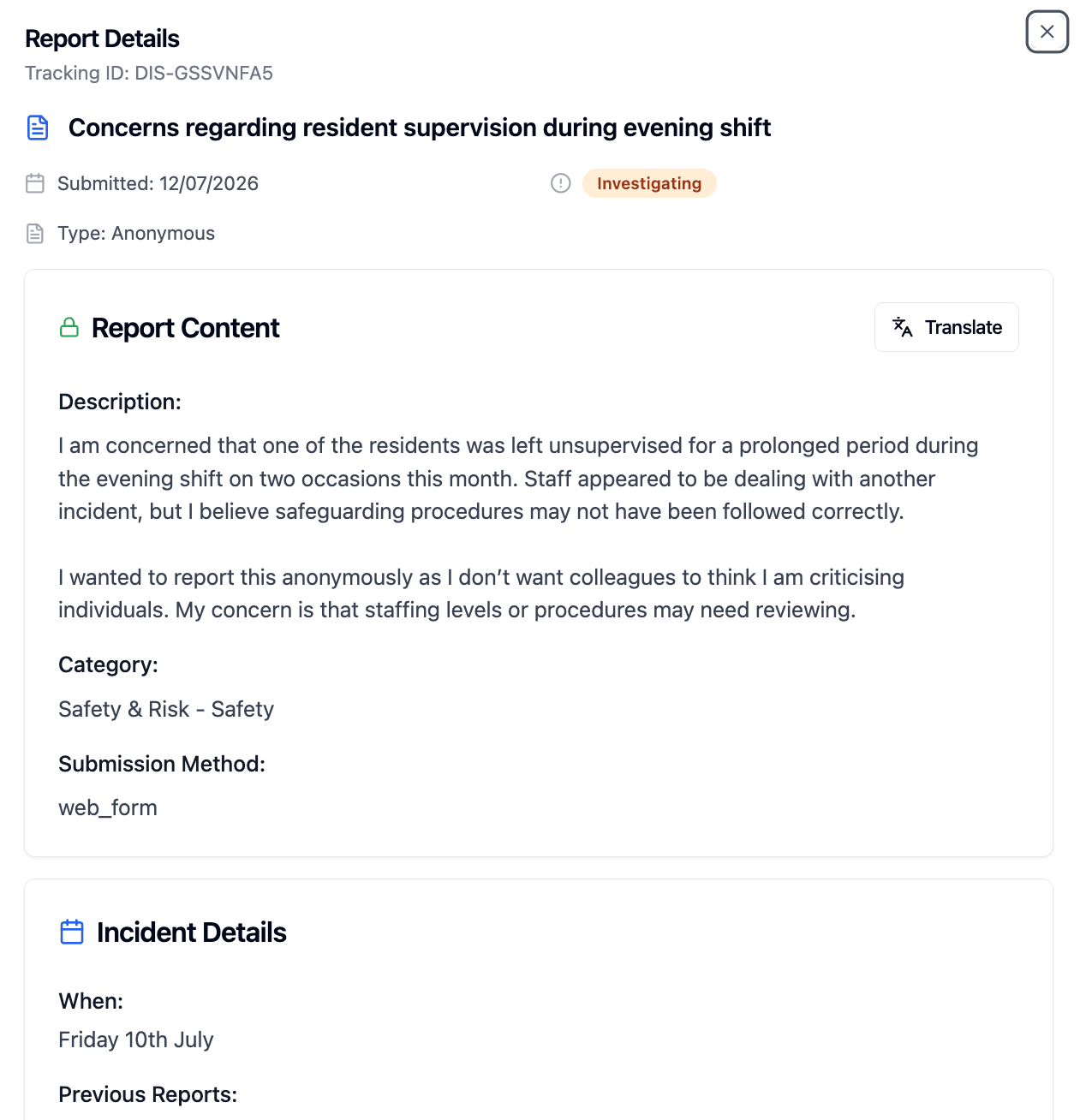
Disclosurely report details for an anonymous report, showing tracking ID, investigating status, report content, category and a translate option
Status and priority
Track each case from new to resolved, and set its priority so urgent risks rise to the top.
Ownership and workflows
Assign a named handler, or route cases automatically with assignment rules and workflows.
One case file
Messages, evidence, internal notes and status history stay together on the case.
Timeframes
SLA policies help you keep to the response times your policy commits to.
AI triage
Suggested risk levels help you prioritise. AI supports your handlers; it does not decide outcomes.
Translation
Translate report content into your language when your workforce writes in several.
Explore case management

4 · Record

A record you can stand behind

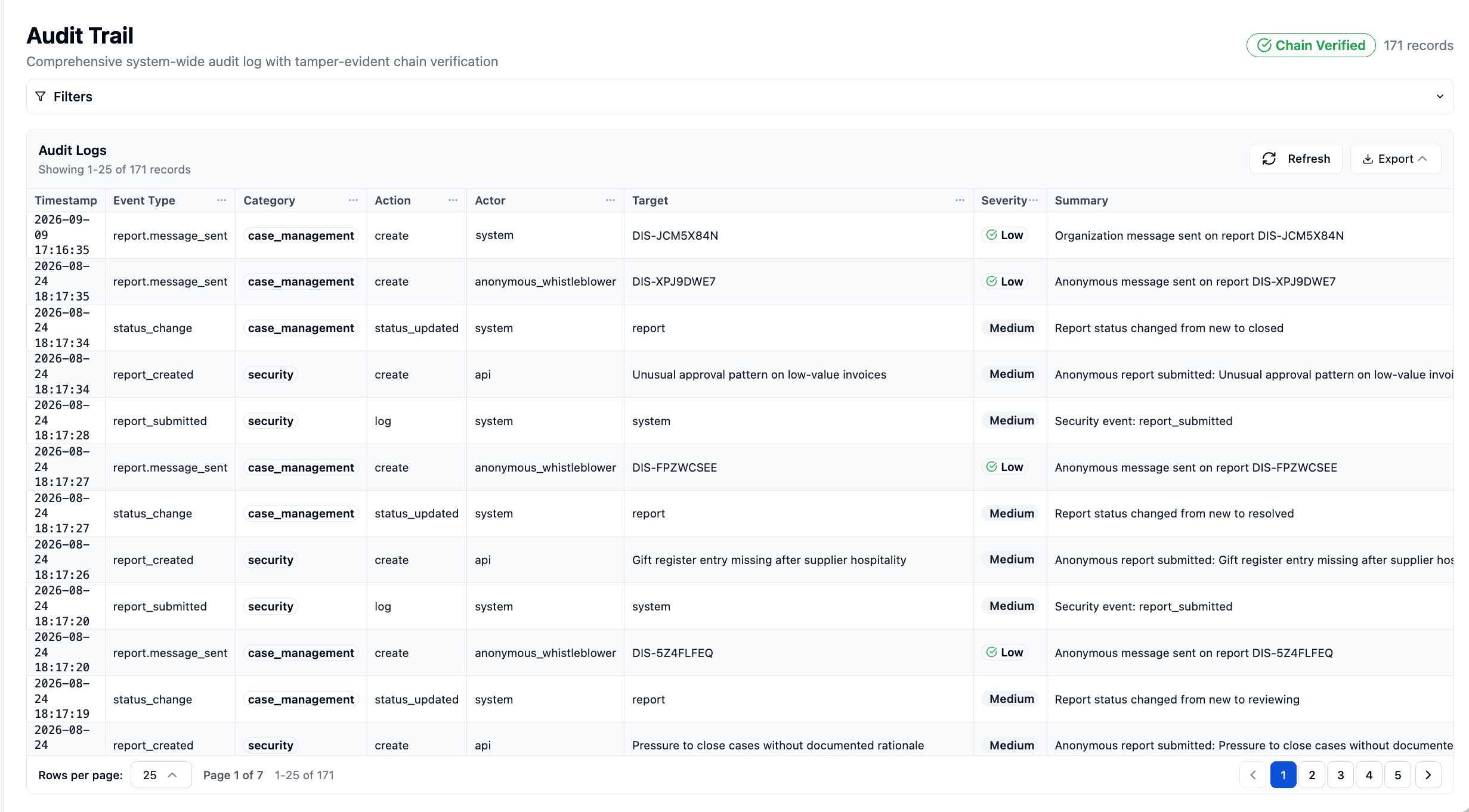
Disclosurely logs case activity, including reports submitted, messages sent, status changes and assignments, in an audit trail with chain verification. It is designed to support change detection and integrity review. When someone asks what happened and when, you export the history instead of reconstructing it.

Disclosurely audit trail listing report submissions, anonymous and organisation messages and status changes, with a Chain Verified indicator
  • Chain verification
  • Filterable activity log
  • Export for review

A clear view of the whole programme

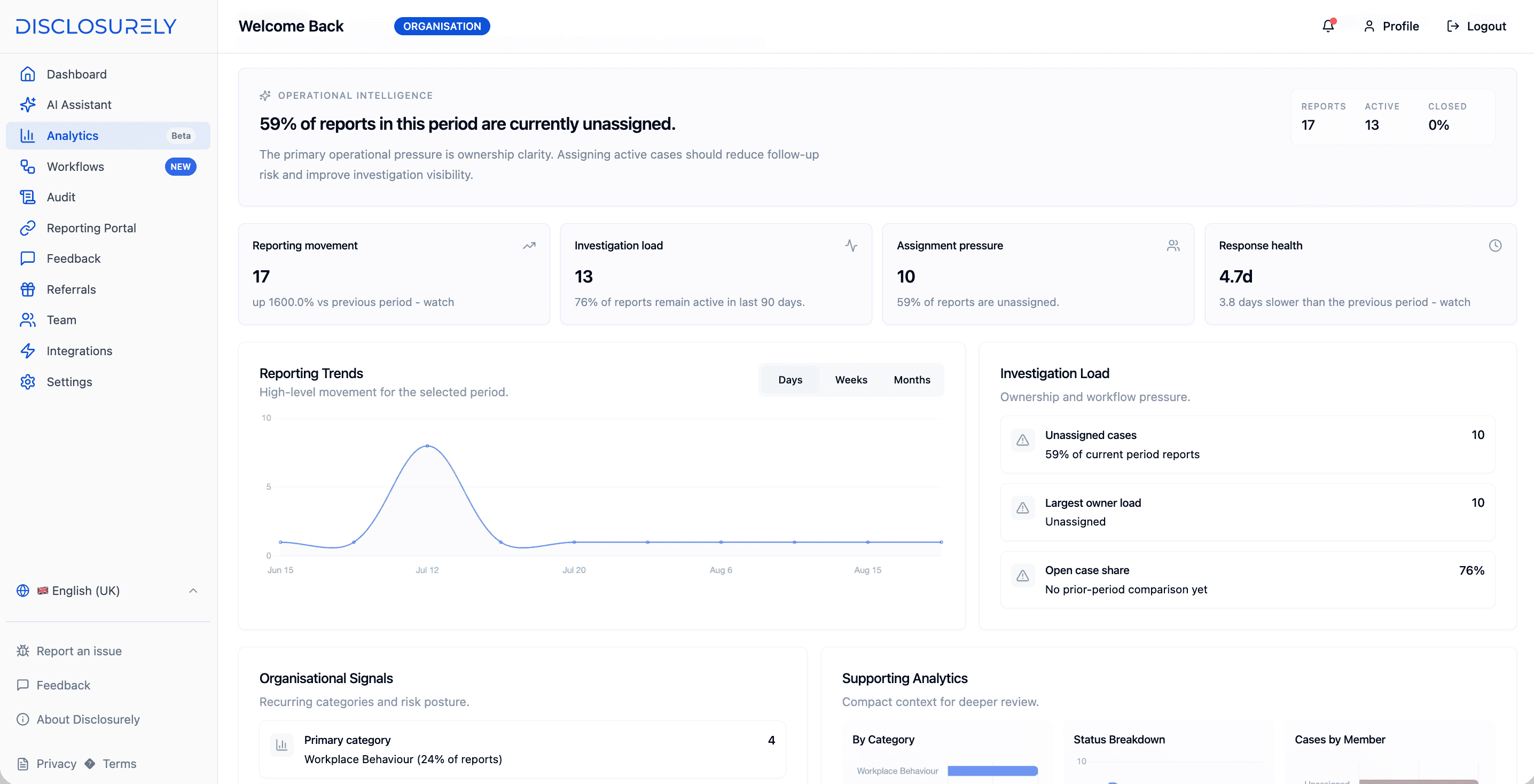
Analytics show report volume, categories, open workload and response times, so leaders can see whether the channel is working and where cases are getting stuck.

Audit trail documentation
Disclosurely analytics showing reporting movement, investigation load, assignment pressure, response health and reporting trends

That’s the whole journey, from first report to final record.

Set up a test portal and follow a report of your own through every stage.

Start free trial

Security and confidentiality

Confidentiality built into how it works

Whistleblowing reports are some of the most sensitive information an organisation holds. These are the controls in place today, explained in plain English.

  • Need-to-know access

    Role-based access for admins and case handlers. Only people you add to your team can see cases.

  • Encrypted data

    Data is protected in transit with TLS and encrypted at rest.

  • EU hosting

    Core case data is stored in the European Union.

  • Sign-in protection

    Team members can protect their accounts with multi-factor authentication using an authenticator app.

  • Retention and deletion

    Organisation-level retention policies, plus workflows for export and deletion requests.

  • AI with clear limits

    Report content may be processed by a third-party AI provider to support features such as risk suggestions and case search. AI does not decide outcomes, and customer data is not used to train public AI models.

Our Security Centre sets out what is in place and what is still on the way, including single sign-on and certifications in progress.

Visit the Security Centre

Law and obligations

What the law expects, and where software fits

Software supports a whistleblowing process. It does not replace your policy, your people or legal advice. Here is a short summary of the rules most UK and European organisations work within.

United Kingdom

  • Workers are protected from detriment, and employees from unfair dismissal, for making a protected disclosure under the Employment Rights Act 1996, as amended by the Public Interest Disclosure Act 1998.
  • A protected disclosure is information the worker reasonably believes shows wrongdoing, such as a crime, a breach of a legal obligation or a danger to health and safety, and that sharing it is in the public interest.
  • Since 6 April 2026, this can include sexual harassment. The public interest test still applies.
  • Employers are not legally required to have a whistleblowing policy, but government guidance recommends one. Some regulated firms, such as those covered by the FCA’s SYSC 18 rules, have specific requirements.
Protected disclosures explained

European Union

  • Under the EU Whistleblowing Directive, as implemented by each member state, private organisations with 50 or more workers must have internal reporting channels. Some countries extend this to smaller organisations.
  • Reports must be acknowledged within seven days, with feedback within a reasonable timeframe of no more than three months.
  • Reporting must be possible in writing, orally or both, and reporters can ask for a meeting in person.
  • The reporter’s identity must stay with authorised staff unless they give explicit consent or the law requires disclosure.
  • The Directive covers breaches of EU law in specific areas. National laws often go further, and each country decides whether anonymous reports must be followed up.
EU Whistleblowing Directive guide

Official sources · Articles 2, 6, 8, 9 and 16

Disclosurely provides

  • A secure written channel that does not ask for the reporter’s name
  • Two-way follow-up that protects the reporter’s identity
  • Case assignment, status tracking and SLA policies to help meet timeframes
  • Role-based access and an audit trail you can export

Your organisation remains responsible for

  • A whistleblowing policy and clear communication to staff
  • Impartial, trained people to follow up on reports
  • Deciding whether a concern is a protected disclosure or a grievance
  • Offering oral reporting or a meeting where the law requires it
  • Meeting legal deadlines and data protection duties as data controller

Choosing software

Six questions to ask any whistleblowing software provider

Feature lists look alike. These questions show how a product will hold up when a real case arrives.

  1. 01

    Can reporters stay anonymous and still answer questions?

    Disclosurely: Yes. A tracking ID and access secret give anonymous reporters a two-way conversation with your team.

  2. 02

    Who owns a report the moment it arrives?

    Disclosurely: Every report becomes a case with a status, a priority and an assigned handler.

  3. 03

    Can you show what happened, months later?

    Disclosurely: Case activity is logged in an audit trail with chain verification, ready to export.

  4. 04

    Who can see what?

    Disclosurely: Role-based access limits cases to the admins and handlers you choose.

  5. 05

    How does the price change as you grow?

    Disclosurely: It doesn’t grow with headcount. Pro is a flat monthly price with no per-employee charges.

  6. 06

    Can you try it before you commit?

    Disclosurely: Yes. Start a free trial and set everything up yourself, without waiting for a sales call.

Pricing

One price for your whole workforce

Many whistleblowing providers price by headcount, so the bill rises every time the organisation grows. Disclosurely Pro is a flat monthly price, the reporting channel is open to your entire workforce, and there is no quote to request before you can try it.

Need procurement support or custom terms?

Enterprise adds dedicated support, multiple domains, security questionnaires, DPA review and custom contracts.

See Enterprise
How whistleblowing software is priced

Pro

No per-employee pricing

£39.99/month

or £399.90/year, two months free

  • Anonymous reporting portal
  • Two-way secure messaging
  • Case management and automated workflows
  • Audit trail with chain verification
  • Branded portal and custom domain
  • AI case triage and risk scoring
  • Email support and onboarding

14-day free trial. No credit card required.

FAQ

Whistleblowing software FAQs

What is whistleblowing software?

Whistleblowing software gives workers a secure channel to report wrongdoing without having to give their name, and gives the organisation one place to acknowledge, investigate and resolve those reports. Unlike an email address or a basic form, it supports two-way follow-up with anonymous reporters, assigns each case to an owner and keeps a record of what was done.

Is whistleblowing software a legal requirement in the UK?

Not as a general rule. Government guidance says employers are not legally required to have a whistleblowing policy, although it recommends one. Workers who make protected disclosures are protected by law whether or not you have a policy, and some regulated firms, such as those covered by the FCA’s SYSC 18 rules, have specific requirements. If your group has entities in EU countries, local laws implementing the EU Whistleblowing Directive may apply to them, so take advice on each country.

GOV.UK guidance for employers (opens in a new tab)
Is every complaint a whistleblowing disclosure?

No. Under UK law, a protected disclosure must be information the worker reasonably believes shows a specified type of wrongdoing, made in the public interest. Personal grievances, such as a dispute about your own pay or treatment, are usually handled under grievance or harassment policies unless the case is in the public interest. Since 6 April 2026, disclosures about sexual harassment can also qualify, but the public interest test still applies. Many organisations let people raise any concern through one confidential channel and have trained handlers decide which procedure applies.

GOV.UK: whistleblowing for employees (opens in a new tab)
Can anonymous reporters be identified?

Disclosurely does not ask reporters for a name, email address or account. Some technical information, such as browser details, may be recorded in activity logs, and anonymity can also be affected by what a report says, for example by describing an event only one person witnessed, so reporters should think about the details they include.

How does Disclosurely help with the EU Whistleblowing Directive?

Where the Directive applies, it expects secure internal channels, acknowledgement within seven days, feedback within three months, an impartial person to follow up and confidentiality for the reporter. Disclosurely supports these with a secure portal, two-way messaging, case assignment, SLA policies, role-based access and an audit trail. Other requirements, such as offering oral reporting or a meeting on request, depend on your own arrangements and national law, so software alone does not make an organisation compliant.

EU Whistleblowing Directive guide
How much does Disclosurely cost?

Pro costs £39.99 per month or £399.90 per year, and the reporting channel is available to your whole workforce with no per-employee pricing. Enterprise is priced individually for organisations that need procurement support, multiple domains or custom contract terms.

View pricing
Is there a free trial?

Yes. Pro includes a 14-day free trial and you don’t need a credit card to start. Set up your reporting portal, submit a test report and work through a case before you decide.

What does setting up involve?

There is nothing to install. You create an account, add your branding and report categories, invite the people who will handle cases, then share your portal link or QR code with employees. You can also connect a custom domain if you want the portal on your own web address.

Who should handle reports internally?

Reports are usually handled by a small group in compliance, HR, legal or senior management who are trained, impartial and not involved in the matters reported. Disclosurely’s role-based access lets you limit each case to those people, and assignment makes it clear who is responsible.

How is this different from a hotline or an anonymous form?

A hotline or form captures the first message. Whistleblowing software also lets you reply to an anonymous reporter, assigns the case to an owner, keeps evidence and decisions in one case file and records the activity for later review. Without those steps, follow-up tends to drift into email and spreadsheets.

See both sides of a report for yourself

Start a free trial, set up your reporting portal and submit a test concern. You will see exactly what an employee sees, and exactly how your team handles it.

14-day free trial · No credit card required